Your phone is almost certainly out of storage. The backup notification keeps appearing. You’ve dismissed it seventeen times. And now you’re looking at two options — Google One and iCloud — trying to figure out which one is worth paying for.
This comparison is trickier than it looks, because Google One and iCloud are not simple alternatives to each other. They have different strengths, work better with different devices, and include different bonus features that can significantly change their value. Here’s the complete breakdown.
What Each Service Actually Does
iCloud is Apple’s ecosystem cloud service. It backs up your iPhone or iPad (settings, app data, messages, photos), syncs data across Apple devices, and provides storage for iCloud Drive (file storage accessible on Mac, iPhone, and iPad). The 5GB free tier fills up within days for most users because it includes phone backup.
Google One is Google’s premium storage subscription. It extends your Google storage — which is shared across Gmail, Google Drive, and Google Photos — and adds a suite of benefits including VPN access, Google expert support, and family sharing. It works on any device (Android, iPhone, or computer) because it’s tied to your Google account, not your hardware.
Pricing: Who Wins on Value?
| Storage | iCloud+ Price/month | Google One Price/month |
| Free | 5GB free | 15GB free |
| 50/100GB | $0.99 (50GB) | $1.99 (100GB) |
| 200GB | $2.99 | $2.99 |
| 2TB | $9.99 | $9.99 |
| 5TB | N/A | $9.99 (available) |
| Family sharing | Included (up to 5 members) | Included (up to 5 members) |
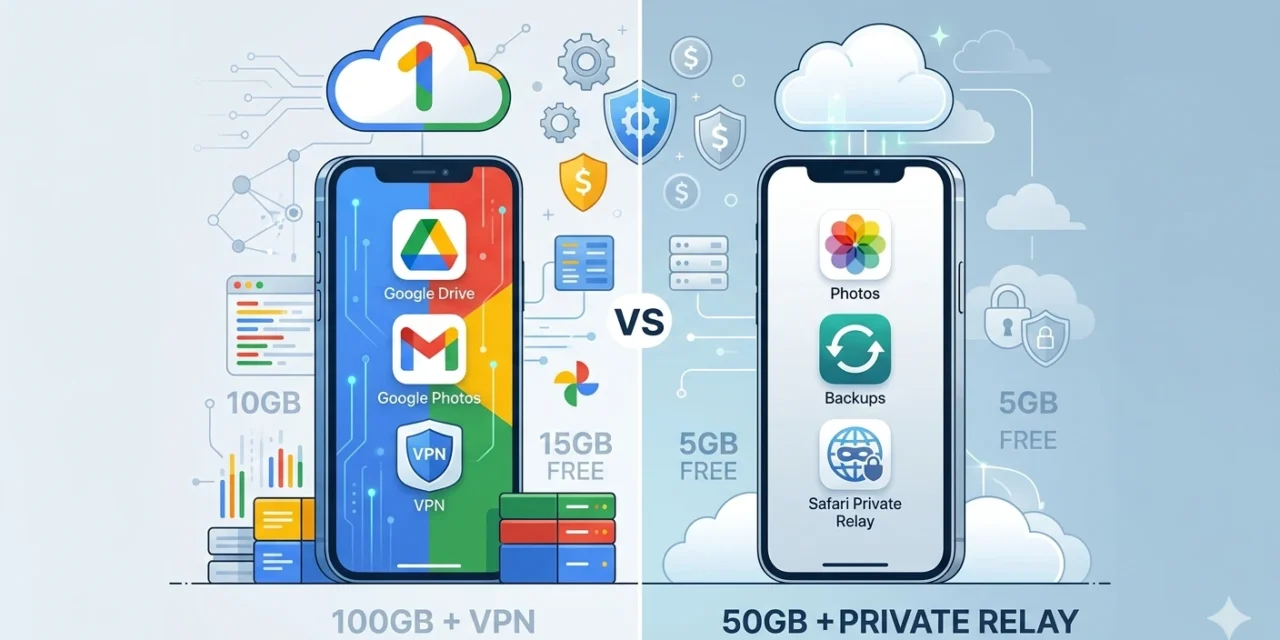
Google’s free tier offers 15GB versus iCloud’s 5GB — a significant advantage for anyone not yet paying. At the 200GB and 2TB tiers, pricing is identical. Google One wins at the 100GB tier ($1.99 vs iCloud’s $0.99 for 50GB — Google offers double the storage for double the price, which is the same value; iCloud’s 50GB is cheaper for lighter users).
Which Is Better for iPhone Users?
For iPhone users, iCloud is the native backup and sync solution. iPhone backups go to iCloud automatically. Your photos sync to the Photos app across iPhone, iPad, and Mac seamlessly. Notes, Reminders, Contacts, Safari bookmarks, and app data all sync via iCloud. This integration is frictionless — it just works.
The limitation: iCloud is primarily an Apple ecosystem service. If you use a Windows PC, iCloud is available but clunkier — the Windows app has historically been unreliable. iCloud.com provides web access to files, photos, and notes, but it’s not as smooth as Google’s web interfaces.
iPhone users who only need phone backup and Apple device sync should start with iCloud. The 50GB tier at $0.99/month is sufficient for most individual users.
iPhone users who also use Gmail, Google Workspace, or Google Photos should consider Google One as a supplement — or replacement — especially if their Google account storage is filling from Gmail attachments and Drive files.
Which Is Better for Android Users?
For Android users, the calculus is more straightforward: Google One is the native ecosystem. Android phones back up to Google (contacts, app data, settings) using your Google account’s storage. Google Photos is the default photo backup app on most Android devices.
Google One’s 15GB free tier, compared to iCloud’s 5GB, makes Google the default reasonable choice for Android users who haven’t thought much about cloud storage. Upgrading to Google One’s 100GB tier at $1.99/month covers most Android users’ backup and file storage needs.
iCloud is available on Android but in a very limited form — you can access iCloud.com in a browser, and iCloud Drive files are accessible there, but there’s no native Android iCloud app. For Android users, iCloud is essentially irrelevant.
The Hidden Benefits Worth Knowing
Both services offer additional benefits beyond storage that significantly affect their value.
iCloud+ (any paid tier) includes: iCloud Private Relay (a Safari-level privacy layer that masks your IP address — similar to a lightweight VPN, though Apple’s terms make clear it’s not a VPN); Hide My Email (generates random email aliases for sign-ups, protecting your real email address); and HomeKit Secure Video support (free encrypted storage for security camera footage, not counting against your storage limit).
Google One (100GB tier and above) includes: Google One VPN (a full VPN for Android, available on iOS as of 2023, included at no extra cost); Google Expert support (live chat with Google advisors for troubleshooting across Google products); Dark Web Monitoring (scans for your email and personal information on dark web databases); and 10% Google Store cashback on hardware purchases.
For Android users who want a VPN, Google One’s 100GB plan at $1.99/month includes one — compared to standalone VPN services costing $4–10/month. This makes Google One’s 100GB tier an exceptional value for Android users who are privacy-conscious.
Photo Storage: A Special Case
Photos deserve separate consideration because they consume the most storage. iCloud Photos syncs your iPhone camera roll across all Apple devices and allows full-resolution originals to be stored in the cloud with device-optimised versions on the device itself (freeing local storage). The experience on Apple devices is seamless.
Google Photos offers unlimited storage for photos at ‘Storage Saver’ quality (compressed slightly from original), or counts against your Google One storage for original quality. The search and organisation features (AI-powered face recognition, object search, automatic albums) are exceptional — arguably better than iCloud Photos for finding specific images in a large library.
Google Photos also works brilliantly on iPhone — many iPhone users use it alongside iCloud Photos as a secondary backup and better search tool. This is a legitimate use case.
Frequently Asked Questions
Can I use both Google One and iCloud at the same time?
Yes, and many users do — especially iPhone users who use Google Photos as a secondary photo backup or rely on Gmail and Google Drive for work. There’s no conflict. iCloud handles Apple device sync and backup; Google One extends your Google account storage for Gmail, Drive, and Photos. You pay for both separately, so make sure the overlap is worth the combined cost.
Is iCloud secure?
iCloud uses end-to-end encryption for sensitive data categories (passwords, Health data, messages) and strong encryption for other data stored on Apple’s servers. In 2022, Apple introduced Advanced Data Protection — opt-in end-to-end encryption for nearly all iCloud data categories, meaning Apple cannot read them. This is the gold standard for cloud storage security. Enable it in Settings → Your Name → iCloud → Advanced Data Protection.
Does Google One include Google Drive?
Google One storage is the storage that Google Drive, Gmail, and Google Photos all share. Upgrading to Google One increases the shared pool that all three services draw from. There’s no separate ‘Google Drive subscription’ — it’s all one storage bucket managed through Google One.
What happens if I cancel my iCloud or Google One subscription?
If you downgrade below your current storage usage, you won’t lose data immediately — but you won’t be able to add new content until you’re back under the free limit. On iCloud, backups will stop and you’ll be reminded to reduce storage. Google applies a similar grace period. The safest approach is to download or delete files before cancelling rather than cancelling and then dealing with the over-limit state.
The Verdict
iPhone users → Start with iCloud+ 50GB at $0.99/month for device backup and Apple ecosystem sync. Add Google One if you heavily use Gmail, Google Drive, or Google Photos.
Android users → Google One 100GB at $1.99/month is the natural choice — and the bundled VPN makes it exceptional value.
Users of both platforms → iCloud for Apple device backup; Google One for cross-platform file storage and the VPN benefit. The 200GB tier on either service at $2.99/month covers most users’ total storage needs in a single subscription.