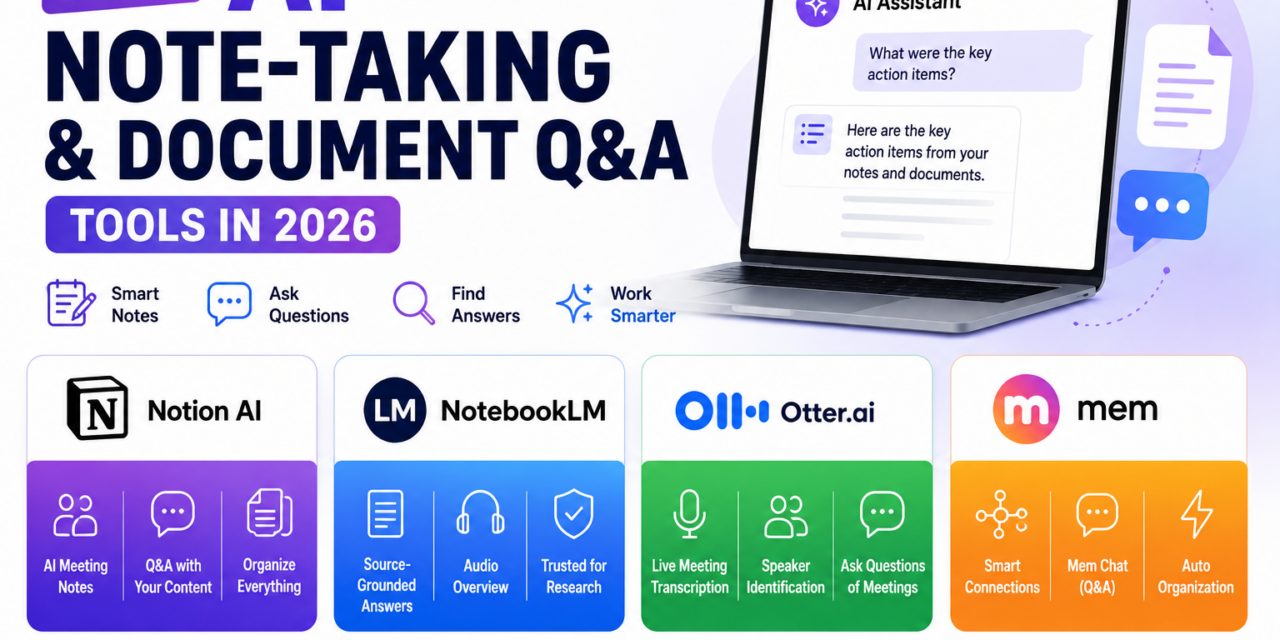
Taking notes has never really been the bottleneck; the real problem has always been finding anything again once it’s buried three weeks deep in a notebook or a folder of scattered documents. AI-powered note-taking and document Q&A tools have addressed this directly in 2026 by letting people simply ask a question of their own notes and get a synthesized answer pulled from across everything they’ve written, rather than manually searching or scrolling. The strongest tools in this category have also gotten considerably better at live meeting capture, turning a spoken conversation into structured, searchable notes without anyone needing to type a word. Here’s a look at the standouts.
Notion AI
Notion AI is built directly into the workspace many teams already use for documentation and project tracking, which means notes, meeting minutes, and research live in the same place they get queried rather than a separate siloed tool. Its Q&A feature can answer questions using only a team’s own Notion content, citing the specific pages an answer was drawn from, which has made it a trusted first stop for onboarding new employees or tracking down a decision made months earlier. Notion’s AI meeting notes feature, added more fully in 2026, can join a call, produce a structured summary with action items, and file it automatically into the right project page without manual copying.
View on Play Store | View on App Store
NotebookLM
Google’s NotebookLM has carved out a distinct niche as a source-grounded research assistant rather than a general note-taking app: users upload specific documents, PDFs, or links, and every answer NotebookLM gives is drawn strictly from that provided source material rather than the model’s general training knowledge. This grounding makes it particularly trusted for academic research, legal document review, and any use case where an ungrounded AI hallucination would be a real problem rather than a minor annoyance. Its Audio Overview feature, which turns a set of uploaded documents into a natural-sounding podcast-style discussion, has become one of the more unexpectedly popular ways people review dense material during a commute.
View on Play Store | View on App Store
Otter.ai
Otter.ai remains one of the most established names specifically for live meeting transcription, joining video calls automatically to produce a real-time transcript alongside AI-generated summaries and action items assigned to specific speakers. Its 2026 version improves speaker identification accuracy considerably in larger group calls, correctly attributing overlapping speech even when several participants talk over one another, a longstanding weak point for transcription tools. Otter’s chat feature lets users ask questions of a past meeting’s transcript directly, pulling up the exact moment a topic was discussed rather than requiring a manual scroll through a lengthy transcript.
View on Play Store | View on App Store
Mem
Mem takes a more automated approach to organization than most note-taking tools, using AI to automatically surface related notes and connections as a user writes, rather than requiring manual tagging or folder structures to keep things findable later. Its Mem Chat feature functions similarly to asking questions of a personal knowledge base, synthesizing an answer from across scattered notes without the user needing to remember exactly where a piece of information was originally captured. The tool has found a particular following among people who take a large volume of fragmented notes and have historically struggled with the organizational overhead that traditional note apps demand.
The clearest trend across this category in 2026 is a shift from note-taking as a passive archive toward note-taking as an actively queryable knowledge base, where the value isn’t just capturing information but being able to ask a direct question and get a synthesized answer back. Teams already embedded in Notion for documentation will likely get the most immediate value from Notion AI simply due to proximity to existing content, while anyone doing serious research against a specific, bounded set of source documents should strongly consider NotebookLM for its strict grounding in provided material. Otter remains the clear choice specifically for live meeting capture, and Mem is worth a look for anyone whose note-taking habit has become too fragmented to organize manually.
Conclusion
AI note-taking and document Q&A tools have quietly solved one of the most persistent frustrations of digital note-taking: the fact that most notes, once written, are effectively never seen again. As these tools keep improving at both capturing conversations accurately and answering genuinely useful questions from accumulated notes, the gap between writing something down and actually being able to use it later keeps shrinking, which makes 2026 a good year to finally get real value out of a note-taking habit.