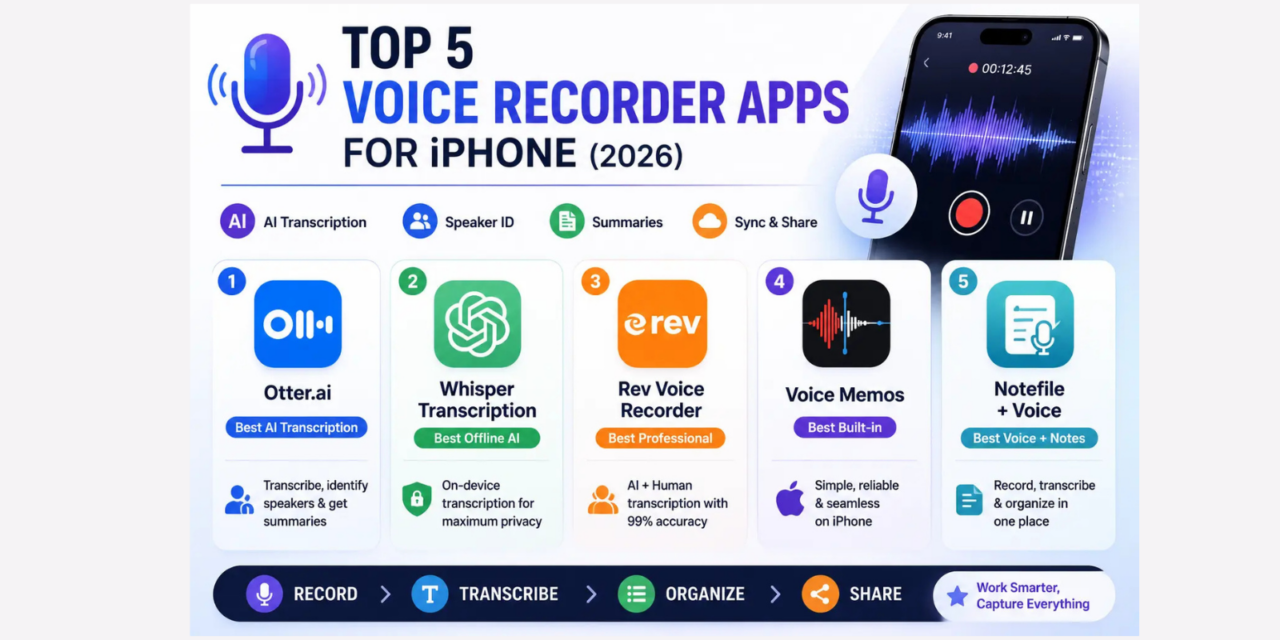
Voice recorder apps on iPhone have moved far beyond simply capturing audio in 2026. The best apps now transcribe recordings automatically, identify different speakers, generate summaries, and integrate with productivity tools to turn voice recordings into actionable text. Whether you record meetings, interview subjects, lecture notes, or personal voice memos, the right app transforms how usable those recordings are after the fact. These five were tested specifically on iPhone across real recording scenarios.
1. Otter.ai – Best AI Transcription and Meeting Notes
Otter.ai is the most capable automatic transcription service available on iPhone in 2026. The AI transcription distinguishes between different speakers in a conversation, labels each speaker’s contributions separately, and generates a timestamped transcript where searching for any word takes you directly to the moment it was spoken in the recording.
The meeting summary feature generates a concise set of key points and action items from any recorded conversation, which turns a one-hour meeting recording into a five-point summary in under two minutes. The integration with Google Meet and Zoom allows Otter to join and transcribe video calls automatically without requiring any action during the call itself.
The free plan provides 300 minutes of transcription per month, which is sufficient for casual use. Otter Pro at sixteen dollars and ninety-nine cents per month provides unlimited transcription minutes and longer individual recording limits.

2. Whisper Transcription – Best Offline AI Transcription
Whisper Transcription runs OpenAI’s Whisper speech recognition model on-device, which means transcription happens without any audio being sent to a server. For recordings involving sensitive information – legal consultations, medical discussions, confidential business strategy – the on-device processing provides a privacy guarantee that cloud-based transcription services cannot match.
The transcription accuracy across English is exceptional and competitive with cloud-based alternatives. Support for over ninety languages makes it the best choice for multilingual users who need transcription in languages less well-served by English-centric services. Processing time is longer than cloud services for longer recordings, but the privacy trade-off is worthwhile for many professional use cases.
3. Rev Voice Recorder – Best for Professional Transcription Quality
Rev provides both an automatic AI transcription service and access to human transcription for recordings where accuracy is critical and the subject matter – legal, medical, technical – may include specialised terminology that AI transcription occasionally mishandles. The iPhone app captures high-quality audio and submits recordings to Rev’s transcription service directly.
The human transcription service provides 99% accuracy guarantees and typically delivers transcripts within twelve hours, with rush options for faster turnaround. For professionals whose recordings will be used as legal or official records, Rev’s human transcription is worth the premium cost over AI-only alternatives.
4. Voice Memos – Best Built-In Recording App
Apple’s built-in Voice Memos app has received meaningful improvements in 2026 and deserves consideration before reaching for a third-party alternative. The iCloud sync keeps recordings accessible across all Apple devices automatically, the background recording continues even when the screen is off or other apps are open, and the enhanced recording quality mode captures audio at higher fidelity on supported iPhone models.
For users who need reliable, simple audio capture with seamless Apple ecosystem integration and no additional cost, Voice Memos handles the core recording use case well. The absence of automatic transcription is the primary limitation that drives users toward third-party alternatives.
Voice Memos is built into every iPhone. No download required.
5. Notefile + Voice – Best for Integrated Notes and Recordings
Notefile integrates voice recordings directly into text notes, allowing a recording to be accompanied by written context, tags, and links to related content in a single note. For journalists, researchers, and students who take notes alongside recordings rather than as separate documents, this integration removes the friction of cross-referencing between a recording app and a notes app.
The automatic transcription feature in Notefile’s 2026 update converts voice recordings to text within the note itself, making the content searchable alongside written notes without requiring a separate service.
Which Voice Recorder App Should You Use
For meeting transcription and summaries with team collaboration: Otter.ai. For privacy-sensitive recordings requiring on-device processing: Whisper Transcription. For critical professional recordings needing human transcription accuracy: Rev. For simple reliable recording within the Apple ecosystem at zero cost: Voice Memos. For integrated voice and text notes in a research or journalism workflow: Notefile. The right choice depends primarily on whether automatic transcription is a requirement and how sensitive the audio content is from a privacy standpoint