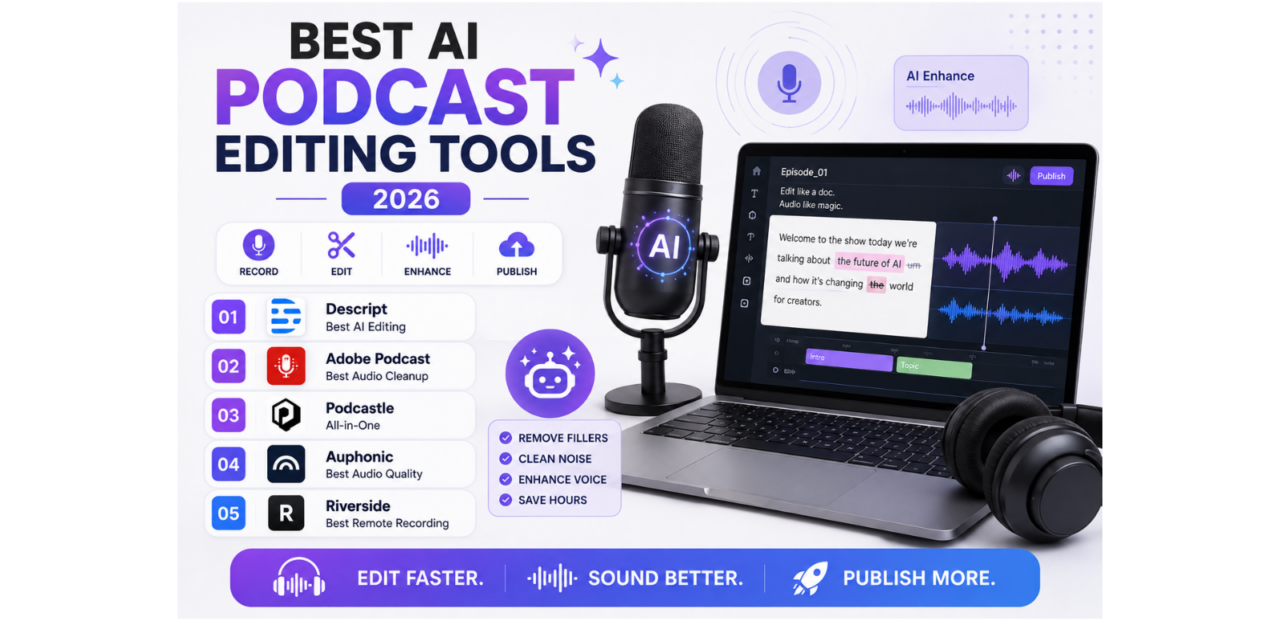
Editing a podcast episode manually, cutting out filler words, awkward pauses, and background noise, used to consume far more time than the actual recording itself, a genuinely discouraging ratio that’s kept many aspiring podcasters from ever publishing consistently. AI-powered podcast editing tools have changed that math considerably, automatically detecting and removing filler words, cleaning up background noise, and even improving voice quality through AI enhancement, cutting editing time from hours down to minutes for a typical episode. Here are five AI podcast editing and production tools worth using this year for genuinely faster, more polished episodes. Most also generate ready-to-post show notes and social clips automatically, saving additional time beyond just the core audio editing itself.
Descript
Descript’s standout feature lets creators edit audio by editing a text transcript directly, deleting a word from the text automatically removes the corresponding audio, dramatically speeding up rough cuts and filler word removal.
Adobe Podcast
Adobe Podcast’s AI-powered Enhance Speech feature cleans up background noise and room echo automatically, making a recording captured in a less-than-ideal environment sound genuinely close to studio quality.
Podcastle
Podcastle combines AI-assisted editing with built-in recording and hosting features, appealing to podcasters wanting an all-in-one platform rather than stitching together separate tools for recording, editing, and publishing.
Auphonic
Auphonic specializes specifically in automated audio leveling and mastering, ensuring consistent volume across multiple speakers and episodes without requiring manual audio engineering knowledge from the podcaster.
Riverside
Riverside focuses on genuinely high-quality remote recording with local capture on each participant’s device, avoiding the audio quality loss that video calling software often introduces, then layers AI editing tools on top.
The right tool depends on which specific part of production actually causes the most friction. Descript suits podcasters who want fast, text-based rough cuts and filler word removal as their primary time-saver. Adobe Podcast is worth using specifically for episodes recorded in imperfect environments, home offices, cars, noisy rooms, since its noise cleanup genuinely rescues otherwise unusable recordings. Podcastle suits podcasters wanting one connected platform rather than juggling separate recording, editing, and hosting tools. Auphonic is worth adding specifically for shows with multiple guests or inconsistent volume levels across episodes, since consistent audio leveling matters more for listener experience than most podcasters initially realize. Riverside’s local recording approach matters most for remote interview shows where call quality would otherwise limit the final audio quality regardless of editing. It’s worth testing any new tool on a short throwaway recording before trusting it with a genuinely important interview, since first-time setup issues are far less costly to discover on a test file. Many of these tools also offer a genuinely usable free tier or trial period long enough to edit a full episode end to end, making it worth comparing two directly on the exact same raw recording before settling on one as a long-term default.
AI podcast editing tools have removed the single biggest barrier that used to discourage consistent publishing, the sheer time cost of manual editing relative to the actual recording. Pick based on whichever specific production step currently eats the most time, and reclaim those hours for actually planning better episodes rather than manually trimming out every stray pause. Consistency of publishing, more than any single polished episode, tends to be what actually grows a podcast’s audience over time, and removing the editing bottleneck is often the single biggest lever toward staying consistent.