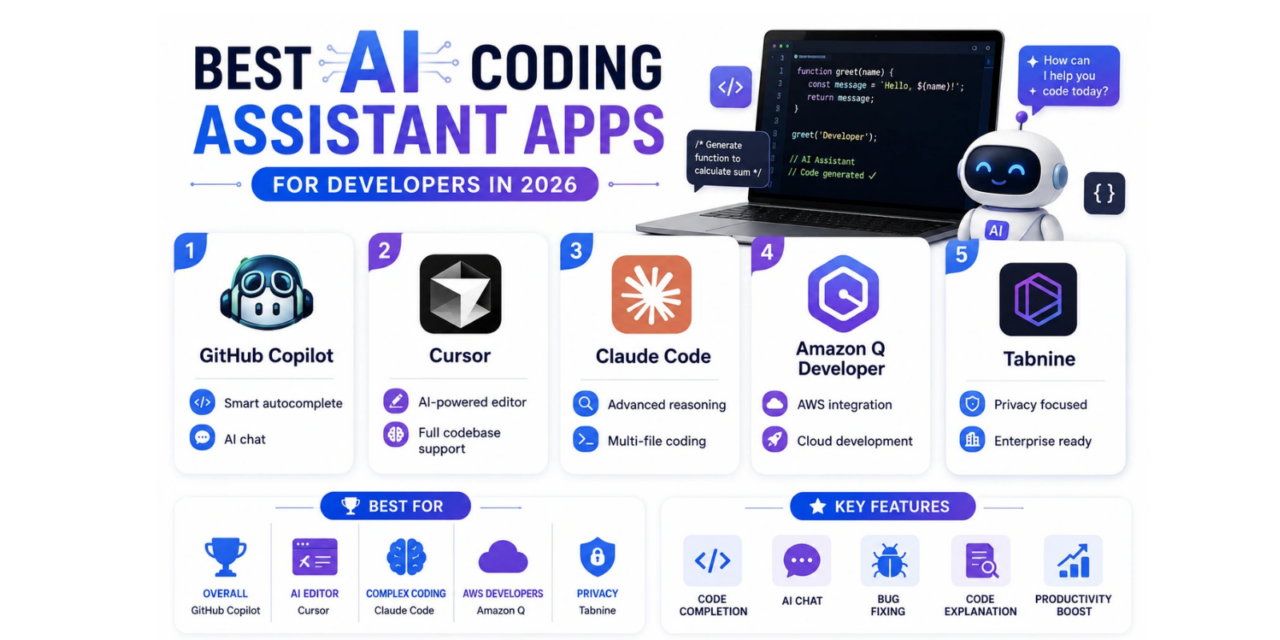
AI coding assistants have moved well past simple autocomplete, now capable of writing entire functions from a comment, explaining unfamiliar code, and even debugging errors with genuine contextual understanding of an entire codebase rather than just the current file. That evolution has made choosing the right assistant a genuinely meaningful decision for developer productivity, not just a nice-to-have convenience feature. Different tools also take genuinely different philosophical approaches, some bolt onto an existing editor, others rebuild the entire development experience around AI from the ground up. Here’s how the top AI coding assistant tools compare in 2026, based on code quality, context awareness, and how well each fits into an existing development workflow.
GitHub Copilot
Copilot remains the most widely adopted AI coding assistant, with genuinely strong autocomplete suggestions and a chat interface that understands broader project context well enough to answer questions about existing code, not just generate new snippets in isolation.
Cursor

Cursor rebuilds the entire code editor around AI assistance rather than bolting it on as a plugin, offering genuinely deep codebase-wide context and multi-file editing capabilities that feel meaningfully more integrated than extension-based competitors.
Claude Code

Claude Code focuses on agentic coding tasks, letting developers delegate multi-step coding work directly from the terminal or IDE with genuinely strong reasoning about complex, multi-file changes rather than just single-line suggestions.
Amazon Q Developer
Amazon Q Developer integrates tightly with AWS services, appealing specifically to teams building cloud infrastructure who want AI assistance that genuinely understands AWS-specific patterns and configuration alongside general coding help.
Tabnine

Tabnine emphasizes privacy and on-premise deployment options more heavily than most competitors, appealing to enterprises with strict code confidentiality requirements that rule out sending proprietary code to a third-party cloud service.
AI Assistants Still Need a Developer Who Understands the Code
Even the best AI coding assistants genuinely still make mistakes, confidently generating code that looks correct but contains subtle logic errors or security vulnerabilities that a careful developer needs to catch before shipping. Treating AI-generated code as a fast first draft rather than a finished product remains essential, especially for anything touching authentication, payments, or user data, where a plausible-looking but subtly wrong suggestion can cause genuinely serious problems if merged without real review. The developers getting the most value from these tools tend to be the ones who already understand the underlying concepts well enough to spot when a suggestion is wrong, rather than relying on the AI to compensate for gaps in their own fundamental knowledge. Junior developers specifically should treat these tools as a way to learn faster by studying the generated code, not as a shortcut that skips understanding the fundamentals entirely.
AI coding assistants have genuinely earned their place in most developers’ daily workflow, cutting down on boilerplate and speeding up the more mechanical parts of writing code considerably. GitHub Copilot remains the safest, most broadly compatible starting point for most developers, while Cursor and Claude Code are worth the switch specifically for those wanting deeper, more agentic AI integration built directly into how they write and edit code. Whichever tool you choose, budget real time to learn its specific quirks, the productivity gains compound considerably once you understand how to prompt and guide it effectively rather than fighting against its default suggestions. Revisit your choice every six months or so too, this category is evolving fast enough that today’s best pick may not stay that way for long.